What is Digital End-of-Life Planning? A Complete Guide
What is Digital End-of-Life Planning?
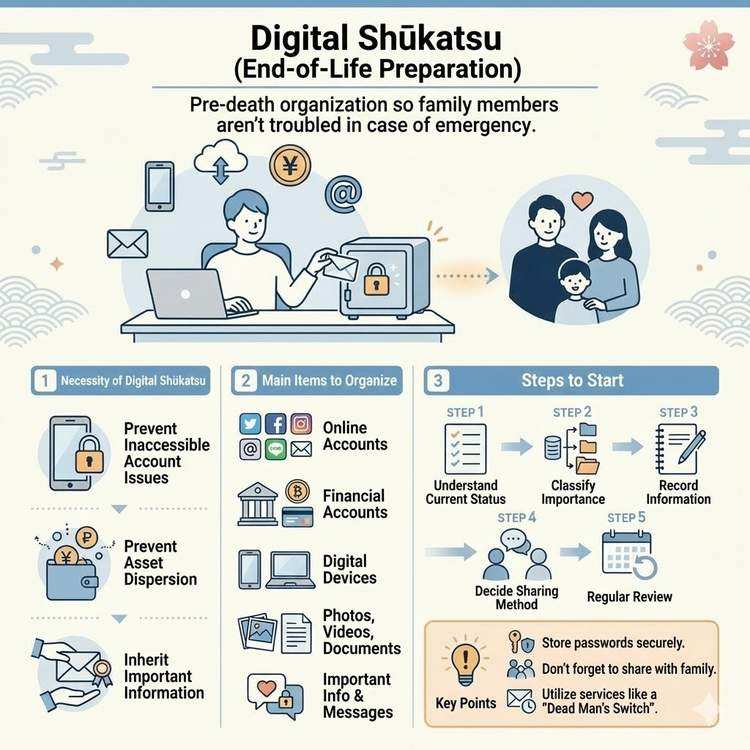
Digital end-of-life planning refers to the process of organizing your digital assets and information to ensure that your family and loved ones won't face difficulties in case something unexpected happens to you. Our lives are filled with digital information: smartphones, computers, SNS accounts, online banking, cloud storage, and more.
Traditional end-of-life planning focused primarily on physical assets such as real estate and savings. However, in today's world, managing digital assets has become equally important.
Why Digital End-of-Life Planning is Necessary
Recently, the following problems have been increasing:
1. Unable to Access Important Information Due to Unknown Passwords
- Cannot log into the deceased's smartphone or computer
- Unable to access online banking account information
- Cannot cancel subscription services, resulting in ongoing charges
2. Unawareness of Digital Assets' Existence
- Family members don't know what services were registered
- Valuable assets like cryptocurrency and points are left abandoned
- Photos, videos, and memories are lost
3. Important Information Known Only to the Individual Cannot Be Shared
- Details of insurance contracts
- Important contacts
- Emergency messages
To prevent these problems, "digital end-of-life planning" involves organizing digital information while you're alive and preparing to properly transfer necessary information.
5 Categories to Organize in Digital End-of-Life Planning
1. Online Accounts
Major Services:
- SNS (Facebook, Instagram, X, LINE, etc.)
- Email accounts (Gmail, Yahoo! Mail, etc.)
- Cloud storage (Google Drive, Dropbox, iCloud, etc.)
- Subscription services (Netflix, Spotify, Amazon Prime, etc.)
What to Do:
- Create a list of services you use
- Record account names (email addresses) and login information
- Clearly identify services to cancel and services to inherit
2. Financial-Related Accounts
Major Services:
- Online banking
- Online securities accounts
- Credit card company portals
- E-money and payment apps (PayPay, Rakuten Pay, etc.)
- Cryptocurrency exchanges
What to Do:
- Create a list of financial institutions and account numbers
- Securely store login information
- Check automatic withdrawals and recurring payments
3. Digital Devices
Target Devices:
- Smartphones
- Computers (desktop and laptop PCs)
- Tablets
- Smartwatches
What to Do:
- Record passcodes and passwords for each device
- Clearly identify where important data is stored
- Create backups
4. Photos, Videos, and Documents
Storage Locations:
- Cloud storage
- External HDDs and SSDs
- SD cards
- Recording media like DVDs
What to Do:
- List storage locations
- Distinguish between data you want to leave for your family and data you want deleted
- Record access methods
5. Important Information and Messages
Information to Share:
- Wishes regarding medical care and nursing
- Intentions regarding funeral and burial
- Messages of gratitude to family
- List of important contacts
- Details of various contracts
How to Start Digital End-of-Life Planning: 5 Steps
Step 1: Current Assessment (Inventory)
First, understand what digital services you're using.
Specific Methods:
- Check the app list on your smartphone
- Review bookmarks on your computer
- Confirm service registrations from email history
- Identify subscription services from credit card statements
We recommend writing everything down in a paper notebook or Excel sheet.
Step 2: Prioritize by Importance
Classify the services and information you've identified by importance:
A: Highest Priority (High monetary value, necessary for legal procedures)
- Bank accounts, securities accounts
- Insurance contracts
- Real estate-related contracts
- Credit cards
B: High Priority (Need to decide whether to continue or cancel)
- Monthly subscription services
- Phone and internet contracts
- E-money
C: Medium (Personally important but low monetary value)
- Photo and video data
- SNS accounts
- Email accounts
D: Low Priority (As needed)
- Game accounts
- Free service accounts
Step 3: Organize and Record Information
Record the classified information. Items to record:
- Service name
- Account name (email address or user ID)
- Password (or storage location)
- Two-factor authentication settings
- Cancellation method
- Whether you wish to transfer to family
Recording Method Options:
- Paper notebook (recommended: high security but troublesome to update)
- Password management apps (1Password, LastPass, etc.)
- Dedicated ending note
- Automatic sending service like Dead Man's Switch
Step 4: Decide How to Share with Family
Decide how to convey the organized information to your family.
Options:
1. Share Information While Alive
- Advantage: Can be addressed immediately
- Disadvantage: Security risk
2. Only Tell Them the Storage Location
- Advantage: Balance between security and convenience
- Disadvantage: Storage location might be forgotten
3. Use Third-Party Services
- Advantage: Secure and reliable
- Disadvantage: May incur costs
4. Utilize Dead Man's Switch
- Advantage: Automatic sending in emergencies, peace of mind with regular checks
- Disadvantage: Requires periodic login
Step 5: Regular Review
Digital end-of-life planning is not a one-time task.
Review Timing:
- Once a year (birthday or New Year's)
- When registering for new services
- When changing important contracts
- When life changes (moving, job change, etc.)
Regular updates keep information current.
Important Considerations for Digital End-of-Life Planning
Security Measures
When recording important information like passwords, pay attention to:
-
When Writing on Paper
- Store in a safe or locked drawer
- Tell family members the storage location
- Don't make multiple copies
-
When Managing Digitally
- Use password management tools
- Make master password strong
- Always set up two-factor authentication
-
When Using Services
- Choose trustworthy services
- Read terms of service carefully
- Check security features
Communication with Family
- Tell family you're doing digital end-of-life planning
- Share storage location of important information
- Have them regularly review the content
Legal Aspects
- Treat separately from a will
- Sharing financial institution passwords may violate terms of service
- Consider consulting lawyers or tax accountants
Making Digital End-of-Life Planning Efficient with Dead Man's Switch
Traditional digital end-of-life planning was time-consuming in organizing and storing information, and the timing of transfer to family was difficult.
Features of Dead Man's Switch:
-
Regular Life Verification
- Verify survival by logging in at set intervals
- Automatically send messages in case of emergency
-
Secure Information Management
- Two-factor authentication support
- Encrypted communication
- Secure login feature
-
Gradual Information Disclosure
- Send only necessary information to necessary people
- Can set multiple recipients (Premium plan)
-
Flexible Schedule Settings
- Freely set from 1 hour to over 1 year
- Adjustable to your lifestyle
The free plan offers basic features, so we recommend trying it first.
Summary
Digital end-of-life planning is essential preparation to ensure your family won't face difficulties in case something happens.
What You Can Start Today:
- List apps on your smartphone
- Check active subscription services
- Decide how to store passwords
- Consider services like Dead Man's Switch
You don't need to be perfect. It's important to start with what you can do.
Related Articles:
- Key Points for Creating Messages for Emergencies
- How Dead Man's Switch Works and How to Use It
- How to Organize Your Digital Legacy
Share This Article
About the Author
偽弟 (Gitei)
@danna6583973613 years in IT industry, 11 years as PM/PO. Designed and operated systems with 100M monthly visits, managed teams of 40+ members. Expert in E-commerce and enterprise systems, proficient in cryptographic protocols and authentication/authorization system design. Utilizes Claude Code and Gemini AI for secure, high-quality code implementation.
Learn More About the Author