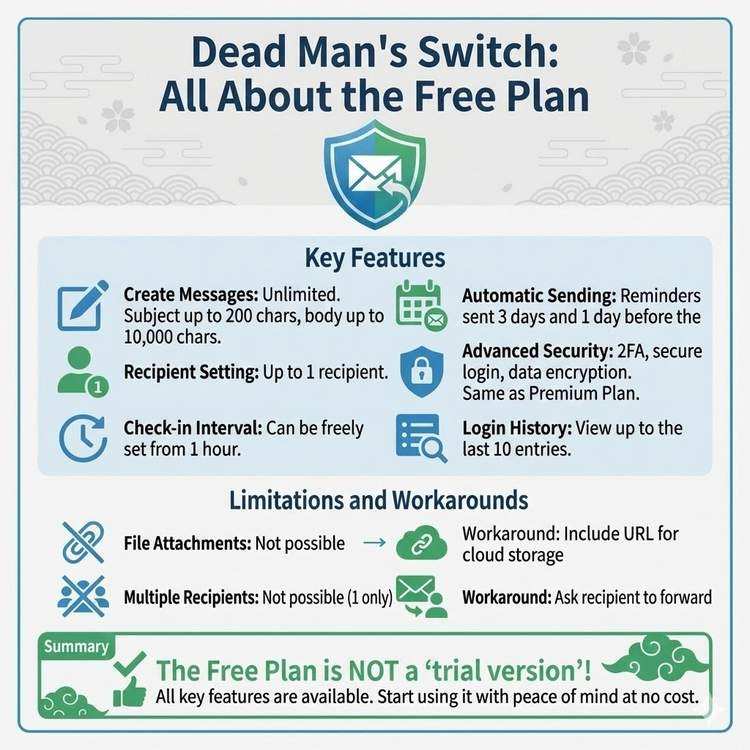
What Dead Man's Switch Free Plan Can Do
Complete List of Free Plan Features
Dead Man's Switch free plan offers comprehensive basic features without restrictions.
Main Free Plan Features
| Feature | Free Plan | Premium Plan | |---------|-----------|--------------| | Message Creation/Editing | ✅ Unlimited | ✅ Unlimited | | Recipient Setting | ✅ 1 recipient | ✅ Up to 5 | | Check Interval Setting | ✅ 1 hour+ flexible | ✅ 1 hour+ flexible | | Automatic Sending | ✅ Yes | ✅ Yes | | Reminder Emails | ✅ Yes | ✅ Yes | | Two-Factor Auth (2FA) | ✅ Yes | ✅ Yes | | Secure Login | ✅ Yes | ✅ Yes | | Login History | ✅ Recent 10 | ✅ Unlimited | | Data Encryption | ✅ Yes | ✅ Yes | | File Attachments | ❌ No | ✅ Up to 10MB | | Multiple Recipients | ❌ No | ✅ Up to 5 | | Custom Notifications | ❌ No | ✅ Yes | | Priority Support | ❌ No | ✅ Yes |
Feature 1: Message Creation and Editing
What You Can Do
Character Limits:
- Subject: Maximum 200 characters
- Body: Maximum 10,000 characters
This equals 25 manuscript pages, sufficient capacity for detailed information.
Creation Example:
【Subject】Message for Emergencies

【Body】
To my beloved family,

If you're reading this message,
something must have happened to me.

[Message of gratitude: approximately 500 characters]

Below is important information:

■ Financial Institution Information
・XX Bank, XX Branch, Savings Account 1234567
  Balance: Approximately ¥XX million
・YY Securities, Account Number: 7654321
  Assets: Approximately ¥XX million

■ Insurance Contracts
・Life Insurance: XX Life, Policy Number XXXX-XXXX
  Insurance Amount: ¥10 million
  Contact: 0120-XXX-XXXX

[Continued information: approximately 2,000 characters]

[Final message: approximately 300 characters]
Editing Features:
- Edit freely anytime
- Saves immediately
- Edit history not retained (always latest version only)
- No limit on number of changes
Usage Tips
1. Use Templates
【Structure Example】
1. Opening greeting (200 characters)
2. Message of gratitude (500 characters)
3. Financial information (1,000 characters)
4. Digital account information (1,000 characters)
5. Emergency contacts (500 characters)
6. Procedure steps (1,000 characters)
7. Final message (300 characters)

Total: Approximately 4,500 characters (plenty of room)
2. Organize with Headings
Using "■" or "【】" for headings
significantly improves readability.

■ Bank Account Information
【Emergency Contacts】
3. Use Bullet Points
・List items with bullets
・Increases visibility
・Makes information easier to find
Feature 2: Recipient Setting (1 recipient)
What You Can Do
Setting Items:
- Recipient email address: 1
- Recipient name (optional)
- Email address change: Possible anytime
Setting Example:
Recipient email address: family@example.com
Recipient name: Family shared email

Or

Recipient email address: wife@example.com
Recipient name: Wife
Cases Where 1 Recipient is Sufficient
Case 1: Married Couple
- Set spouse's email address
- Share all information
Case 2: Family Shared Email
- Set family shared email address
- Everyone can receive information
Case 3: Contacting Parents
- For elderly parents, one email is sufficient
- Children share and respond together
Workarounds for Multiple Recipients
Even with the free plan, you can deliver information to multiple people by crafting your message content.
Method 1: Request Forwarding in Message
【Request to Recipient】
Upon receiving this message, please
forward it to the following people:

・Eldest son: son@example.com
・Eldest daughter: daughter@example.com
・Parents: parents@example.com

Content for each person is differentiated
within this message.
Method 2: Categorize Information
■ Information for Spouse
[Information needed only by spouse]

■ Information for Children
[Content to forward to children]

■ Information for Parents
[Content to convey to parents]

■ Information for Friends
[Content to contact friends about]
Feature 3: Check Interval Setting
What You Can Do
Configurable Range:
- Minimum: 1 hour
- Maximum: Unlimited (practically even several years possible)
- Units: Years, months, days, hours, minutes
Setting Examples:
Pattern 1: 1 day (24 hours)
 → For people who use computers daily

Pattern 2: 3 days (72 hours)
 → For those who don't log in on weekends

Pattern 3: 1 week (7 days)
 → For frequent business travelers

Pattern 4: 2 weeks (14 days)
 → For those with long business trips

Pattern 5: 1 month (30 days)
 → For overseas assignments, etc.
Recommended Settings by Lifestyle
Desk Work Centered:
Recommended: 1-3 days
Reason: Use computer daily, so shorter interval OK
Office Workers with Weekend Off:
Recommended: 5-7 days
Reason: Consider possibility of not logging in on weekends
Frequent Business Travelers:
Recommended: 10-14 days
Reason: Can log in during trips but with buffer time
Overseas Residents/Assignments:
Recommended: 14-30 days
Reason: Consider time differences and travel, set longer
Seniors:
Recommended: 3-7 days
Reason: Don't log in daily, but frequency allows family safety checks
When to Change Settings
Should Change When:
- Before long vacations (overseas travel, etc.)
- When hospitalization is scheduled
- When lifestyle patterns change
- When changing jobs or moving
How to Change:
Dashboard > Settings > Check Interval
 ↓
Enter new value
 ↓
Save

Changes take effect immediately
Feature 4: Automatic Sending and Reminders
What You Can Do
Reminder Email Sending:
- 3 days before deadline: 1st notification
- 1 day before deadline: 2nd notification
- Deadline reached: Final notification (24-hour grace period)
Automatic Sending Process:
1. Check interval deadline reached
   ↓
2. Reminder email sent (24 hours remaining)
   ↓
3. No login within 24 hours
   ↓
4. Message automatically sent
   ↓
5. Sending complete
Example Reminder Email
Subject:
【Important】Dead Man's Switch - Message will be sent in 24 hours
Body:
Hello,

This is an important notification from Dead Man's Switch.

The set period has elapsed since your last access.
If there is no login within 24 hours,
your registered message will be automatically sent.

If you receive this email,
please log in immediately.

Login URL:
https://entrust-this.com/login

Secure Login URL:
https://entrust-this.com/secure-login?token=...

If everything is fine, logging in will
postpone the message sending.
How to Prevent False Sending
Method 1: Pay Attention to Reminder Emails
- Develop habit of checking email daily
- Prioritize emails from Dead Man's Switch
Method 2: Bookmark Secure Login URL
- Add to smartphone home screen
- Quick access in emergencies
Method 3: Inform Family
"I'm using a service called Dead Man's Switch.
 If I contact you saying 'please log in for me,'
 please respond immediately"
Feature 5: Two-Factor Authentication (2FA)
What You Can Do
Supported Authentication Methods:
- Authentication apps (Google Authenticator, Authy, etc.)
- Email authentication codes
- Backup codes (10 generated)
Setup Steps:
1. Dashboard > Security Settings
2. Click "Enable Two-Factor Authentication"
3. Scan QR code
4. Enter authentication code
5. Save backup codes
6. Complete
Why 2FA is Important
Risk:
With password only:
・Unauthorized access if password leaks
・Message can be viewed
・Content can be tampered with
After Enabling 2FA:
Password + Authentication code
 ↓
Even if password leaks,
can't log in without smartphone
 ↓
Security dramatically improved
Recommendation Level: ★★★★★ (Essential)
Since Dead Man's Switch stores important information, consider 2FA setup essential.
Feature 6: Secure Login
What You Can Do
What is Secure Login:
- Special login method using long random URL
- No password required
- Only accessible to those who know the URL
Secure Token Example:
https://entrust-this.com/secure-login?token=
f90fd0a855e219afec441b7f4d890809989dfa1510575ccd01018f224624e20c

↑This long string is the secure token (256-bit)
How to Generate:
1. Dashboard > Secure Token
2. Click "Generate New Token"
3. Token URL displayed
4. Save to bookmarks
Usage Scenarios
Scenario 1: Login While Out
- One tap from smartphone bookmark
- No password entry required (2FA still needed)
Scenario 2: Environment Without Password Manager
- Internet cafes, etc.
- From friend's computer
Scenario 3: Quick Emergency Login
- When reminder email received
- Log in immediately to postpone sending
Security Precautions
Don't Do:
- ❌ Share URL with others
- ❌ Post on social media
- ❌ Store where unspecified people can see
Recommended Storage Methods:
- ✅ Smartphone bookmarks
- ✅ Password management tools
- ✅ Save as QR code (print and store in safe)
Feature 7: Data Encryption and Security
What You Can Do
Even the free plan provides security features equal to Premium.
Encrypted Information:
- Login communications (SSL/TLS)
- Database message bodies (AES-256)
- Passwords (bcrypt hashing)
- Secure tokens (encrypted storage)
Other Security Features:
- Login attempt limit (locked after 5 consecutive failures)
- Suspicious login detection
- Session timeout (24 hours)
Login History Verification
Information Visible in Free Plan:
Recent 10 login records:
・Login date/time
・IP address
・Device used
・Login success/failure
Usage Methods:
- Early detection of unauthorized access
- Confirm when you logged in if forgotten
- Increase security awareness
Free Plan Limitations
What You Can't Do
1. Multiple Recipient Settings
Free: 1 recipient only
Premium: Up to 5

Workarounds:
・Use family shared email as recipient
・Request forwarding in message
2. File Attachments
Free: Cannot attach
Premium: Up to 10MB

Workarounds:
・Include cloud storage URLs in message
・Specify "important documents in XX folder"
3. Unlimited Login History
Free: Recent 10 only
Premium: Full history

Impact:
・10 records sufficient in most cases
・No problem for unauthorized access detection
4. Custom Notification Schedule
Free: Fixed at 3 days, 1 day before
Premium: Freely customizable

Impact:
・Can receive basic notifications
・Cannot fine-tune
Who is the Free Plan Right For
✅ Free Plan Recommended For
1. Those Who Want to Try First
- Want to check service usability
- Undecided about full use
2. One Recipient is Sufficient
- Spouse only
- Family shared email
- Only need to reach one specific person
3. No File Attachments Needed
- Text information is sufficient
- Important documents stored separately
4. Want to Keep Costs Down
- Want to use completely free
- Minimum necessary features sufficient
⬆️ Should Consider Premium Upgrade
1. Want Individual Messages to Multiple People
- Different content for spouse, children, parents, etc.
2. Want to Attach Important Documents
- Insurance certificate PDFs
- Password list files
- Photos or videos
3. Need More Advanced Features
- Custom notifications
- Detailed log analysis
- Priority support
Plan Comparison: Free vs Premium
Monthly Costs
Free Plan: ¥0
Premium Plan: ¥100

Annual Cost:
Free: ¥0
Premium: ¥1,200

Less than one cup of coffee, for peace of mind and comprehensive features
Switching Timing
Free → Premium:
- Upgrade possible instantly anytime
- All existing data transferred
- Additional features immediately available
Premium → Free:
- Downgrade possible mid-month
- Recipients limited to 1 (first one remains)
- Attachments deleted
Summary: More Than Enough Features Even Free
Dead Man's Switch free plan isn't just a "trial version," but comprehensive content for serious use.
Main Features Available in Free Plan: ✅ Message creation and editing (unlimited) ✅ Automatic sending function ✅ Activity verification system ✅ Reminder emails ✅ Two-factor authentication ✅ Secure login ✅ Data encryption ✅ Login history verification
Start Now:
1. Account registration (3 minutes)
2. Create message (10 minutes)
3. Set recipient (2 minutes)
4. Set 2FA (5 minutes)

Total: 20 minutes to complete
Completely free, no credit card required
Start with the free plan, and consider upgrading to Premium as needed.
Share This Article
About the Author
偽弟 (Gitei)
@danna6583973613 years in IT industry, 11 years as PM/PO. Designed and operated systems with 100M monthly visits, managed teams of 40+ members. Expert in E-commerce and enterprise systems, proficient in cryptographic protocols and authentication/authorization system design. Utilizes Claude Code and Gemini AI for secure, high-quality code implementation.
Learn More About the AuthorRelated Articles
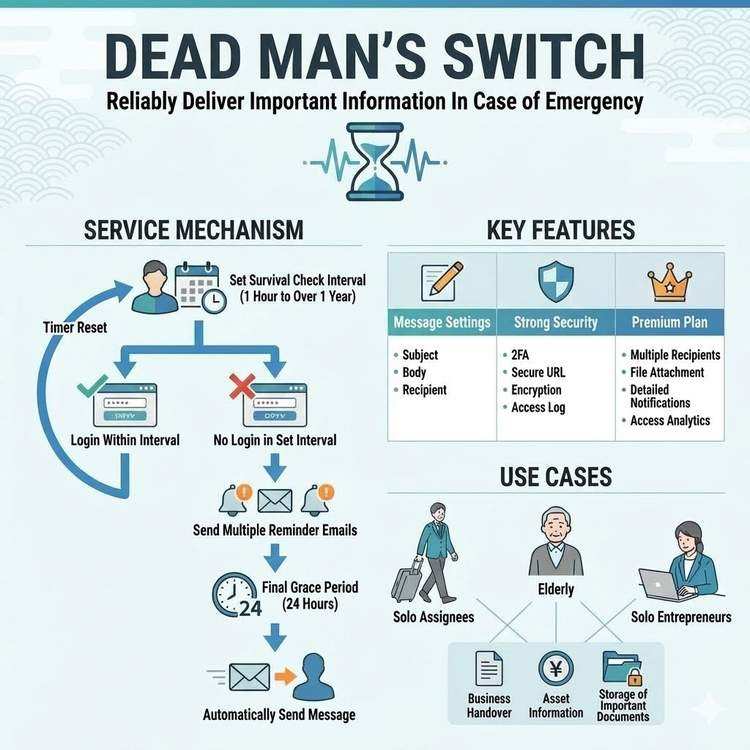
How Dead Man's Switch Works and How to Use It
A detailed explanation of Dead Man's Switch, from its technical mechanisms to practical usage. Understand the life check system and automatic delivery mechanism to use the service with confidence.
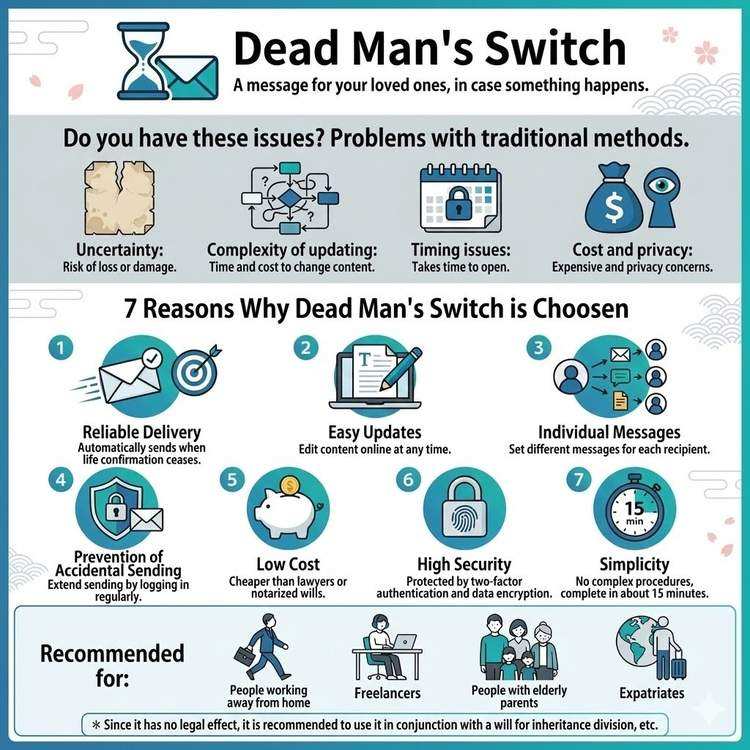
Why Choose Dead Man's Switch
Explore why Dead Man's Switch is the preferred choice and its advantages over traditional methods. Understand why so many people trust this service.
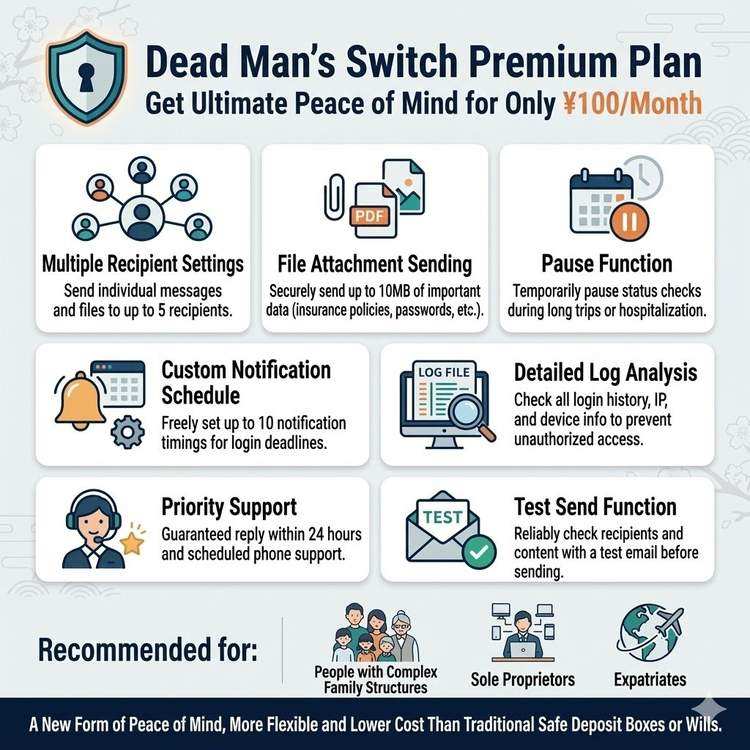
Advanced Usage with Premium Plan Features
Explore all features and advanced techniques of Dead Man's Switch Premium Plan. Master sophisticated usage including multiple recipients, file attachments, and more.