How Dead Man's Switch Works and How to Use It
What is Dead Man's Switch
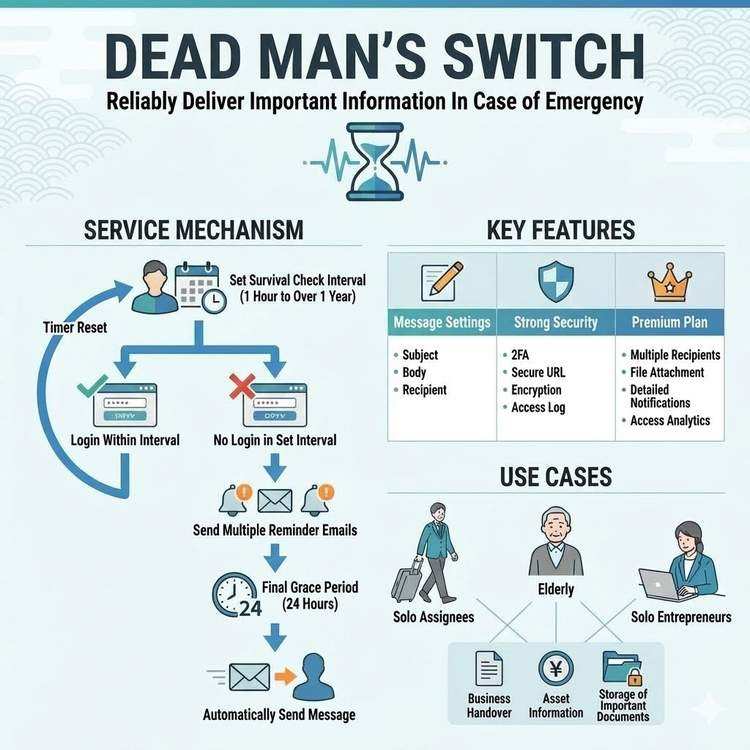
Dead Man's Switch is a service that conducts periodic life checks and automatically sends messages to your loved ones in case something happens to you.
The name comes from the safety device "dead man's switch" used in trains that automatically applies brakes if the operator loses consciousness.
Basic Service Concept
Normal operation:
Periodic login → Message delivery postponed

In case of emergency:
No login for set period → Messages sent automatically
This simple mechanism ensures your message reaches loved ones even if something happens to you.
Life Check Mechanism
1. Setting Check Intervals
Users can set life check intervals according to their lifestyle.
Available range:
- Minimum: 1 hour
- Maximum: Over 1 year
- Recommended: 1 day to 1 week
Setting examples:
■ Daily computer users
→ Set to 1-3 days

■ Weekend-only login users
→ Set to 1 week

■ Frequent business travelers
→ Set to 2 weeks to 1 month
2. Life Confirmation by Login
At each set interval, logging into the service confirms you are "alive."
Confirmation methods:
- Regular login
- Secure login (dedicated URL)
- One-click confirmation from email notification (Premium Plan)
Each login resets the scheduled message delivery time and postpones it.
3. Countdown Function
The remaining time until your next login displays on the dashboard.
Last access: January 6, 2026 10:00
Next check deadline: January 13, 2026 10:00
Time remaining: 6 days and 23 hours
Notification features:
- 3 days before deadline: Reminder email sent
- 1 day before deadline: Second reminder
- Deadline reached: Automatic message delivery
Message Delivery Mechanism
Automatic Delivery Timing
If you don't log in within the set period, messages are delivered through the following process:
Step 1: Deadline reached (when login deadline passes)
System automatically detects
↓
Final confirmation waiting period begins (24 hours)
Step 2: Final confirmation period (24-hour grace period)
Emergency notification email sent
"Messages will be sent if you don't log in within 24 hours"
↓
Login within 24 hours → Delivery canceled
No login for 24 hours → Automatic delivery executed
Step 3: Automatic delivery execution
Messages sent to all registered recipients
↓
Delivery completion notification (if configured)
Customizing Delivery Content
Information you can send:
- Message body (text)
- Subject line (email title)
- Attached files (Premium Plan)
Character limits:
- Subject: Maximum 200 characters
- Body: Maximum 10,000 characters
- Attached files: Maximum 10MB (Premium Plan)
Security Features
1. Two-Factor Authentication (2FA)
Requires additional authentication beyond password at login.
Supported authentication methods:
- Authentication apps (Google Authenticator, Authy, etc.)
- Email authentication codes
- SMS authentication codes (planned)
Recommendation level: Essential
Please enable two-factor authentication to protect important messages.
2. Secure Login Feature
A special login method using a dedicated long URL (secure token).
Features:
- No password required
- Only accessible to those who know the URL
- Token is a 256-bit random string
Usage example:
Regular login URL:
https://entrust-this.com/login

Secure login URL:
https://entrust-this.com/secure-login?token=
f90fd0a855e219afec441b7f4d890809989dfa1510575ccd01018f224624e20c
Use cases:
- Login from outside locations
- Access from uncommonly used devices
- Save as bookmark or QR code
3. Data Encryption
All communications and data are encrypted for storage and transmission.
Encryption targets:
- Login communications (SSL/TLS)
- Message body in database
- Passwords (hashed)
- Secure tokens
4. Access Log Recording
All login history is recorded to detect unauthorized access.
Recorded information:
- Login date and time
- IP address
- Device used
- Login success/failure
Step-by-Step Usage Guide
Step 1: Account Registration (Free)
- Access the official website
- Register email address and password
- Receive authentication code by email
- Verify email address
Time required: 3 minutes
Step 2: Basic Configuration
-
Set check interval
Example: Set to 7 days (1 week) -
Create message
Subject: Emergency Message Body: [Your message] -
Set recipients
Recipient email address: family@example.com
Time required: 10 minutes
Step 3: Security Setup (Recommended)
-
Enable two-factor authentication
- Install authentication app on smartphone
- Scan QR code
- Enter authentication code
-
Generate secure login URL
- Click "Generate Secure Token" from dashboard
- Save generated URL as bookmark
Time required: 5 minutes
Step 4: Regular Login
Log in regularly at set intervals.
Login methods:
- Regular login (email + password + 2FA)
- Secure login (via dedicated URL)
Things to check when logging in:
- Last access date and time
- Next check deadline
- Message content (whether updates are needed)
Premium Plan Exclusive Features
Multiple Recipient Settings
While the free plan allows only one recipient, the premium plan allows up to 5.
Usage examples:
Recipient 1: Spouse (all information)
Recipient 2: Children (emotional messages focused)
Recipient 3: Parents (reassuring messages)
Recipient 4: Friends (business transition information)
Recipient 5: Lawyer (legal information)
You can set different content and subjects for each.
File Attachment Delivery
You can attach files to messages.
Supported file formats:
- PDF (wills, insurance policies, etc.)
- Images (JPG, PNG)
- Office documents (Word, Excel)
Maximum size: 10MB
Usage examples:
- Scanned data of important documents
- Family photos
- PDF password lists
- Digital ending notes
Custom Notification Schedule
More flexible notification settings are possible.
Example:
7 days before deadline: 1st notification
3 days before deadline: 2nd notification
1 day before deadline: 3rd notification (urgent)
Deadline day: 4th notification (final warning)
Access Analytics
Detailed logging and access analysis reports.
Information available:
- Login history for past year
- Access statistics by device
- Access trends by time of day
- Security alert history
Frequently Asked Questions
Q1. What happens if I forget to log in?
A. Reminder emails are sent before the deadline.
- 3 days before: 1st notification
- 1 day before: 2nd notification
- After deadline: 24-hour grace period
If you log in during this period, delivery will be canceled.
Q2. How can I prevent accidental delivery?
A. The following safety nets are in place:
- Reminder emails (advance notification)
- 24-hour grace period
- Final confirmation email before delivery
- Emergency stop function (via link in email)
Q3. What about when traveling abroad?
A. The following methods are available:
-
Log in before departure
- Change check interval to longer period
-
Use secure login URL
- Accessible from smartphone
-
Pause function
- Premium Plan exclusive
Q4. What if I forget my password?
A. Password reset function is available.
- Send reset link to registered email address
- Set new password via link
- Authentication code also required if 2FA is enabled
Q5. How do I cancel the service?
A. You can cancel anytime.
- Go to "Settings" from dashboard
- Select "Delete Account"
- Enter confirmation code
- All data will be deleted
Practical Use Cases
Scenario 1: Business Person on Solo Assignment
Setting: Check interval 3 days
Recipients: Wife and parents at home

Content:
- Business transition information
- Company contact information
- Insurance and asset information
Scenario 2: People with Elderly Parents
Setting: Check interval 7 days
Recipients: Children

Content:
- Primary care physician information
- List of medications taken
- Funeral preferences
- Location of important documents
Scenario 3: Independent Business Owner
Setting: Check interval 5 days
Recipients: Business partners, family

Content:
- Client list
- Ongoing project information
- Account information
- Location of contract documents
Conclusion: Achieving Peace of Mind
Dead Man's Switch realizes reliable information delivery through a simple mechanism.
Three pillars of the service:
- Reliability - Ensuring messages reach recipients when needed
- Security - Safely storing important information
- Flexibility - Settings adaptable to your lifestyle
What you can do right now:
- Create a free account
- Write a simple message
- Set check interval
- Log in regularly
You don't need to be perfect. What matters is getting started.
Share This Article
About the Author
偽弟 (Gitei)
@danna6583973613 years in IT industry, 11 years as PM/PO. Designed and operated systems with 100M monthly visits, managed teams of 40+ members. Expert in E-commerce and enterprise systems, proficient in cryptographic protocols and authentication/authorization system design. Utilizes Claude Code and Gemini AI for secure, high-quality code implementation.
Learn More About the AuthorRelated Articles
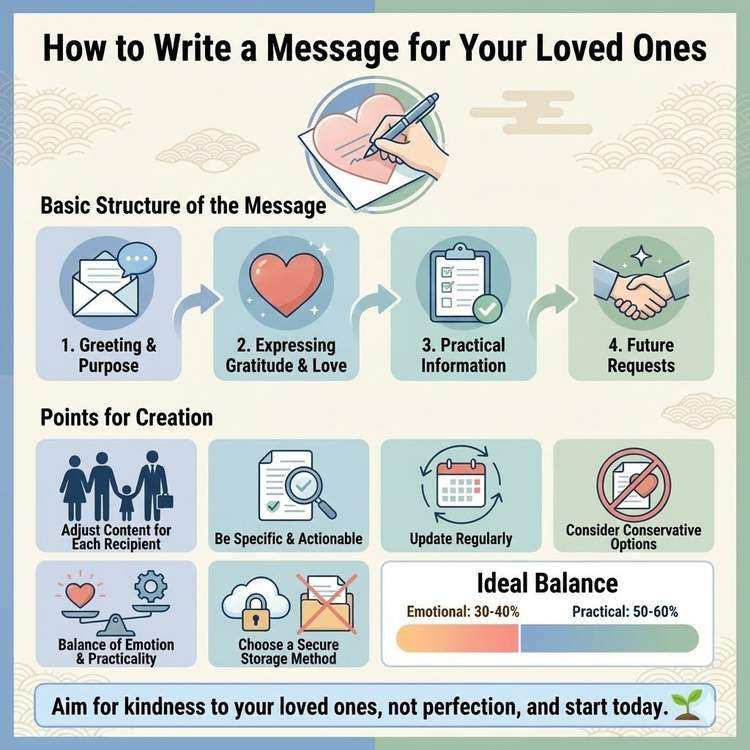
Key Points for Creating Messages for Emergencies
Learn how to write messages for loved ones, from emotional content to practical information. Discover the essential content and effective structure for your messages.
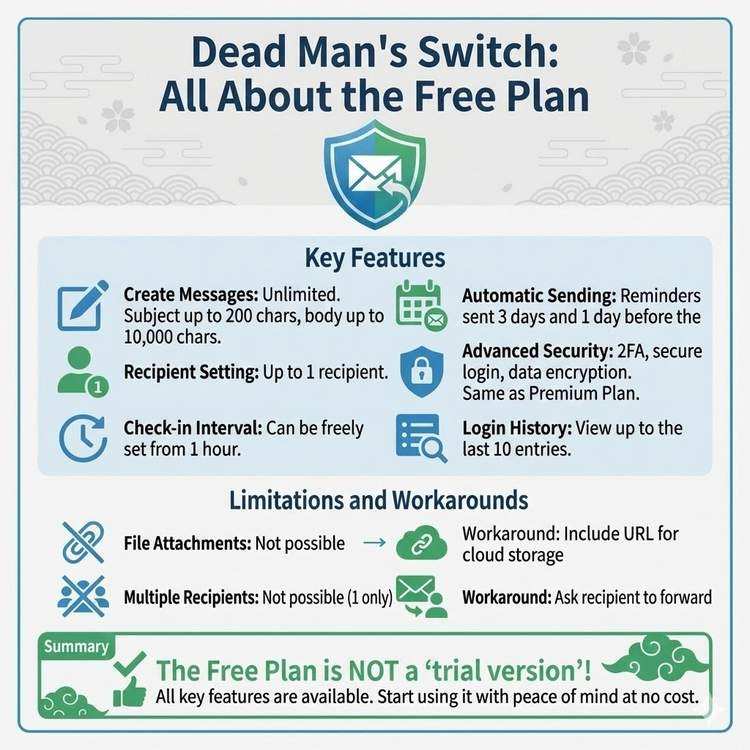
What Dead Man's Switch Free Plan Can Do
Detailed explanation of all features available in the free plan. From basic message sending to advanced security features, discover the full scope of what you can use for free.
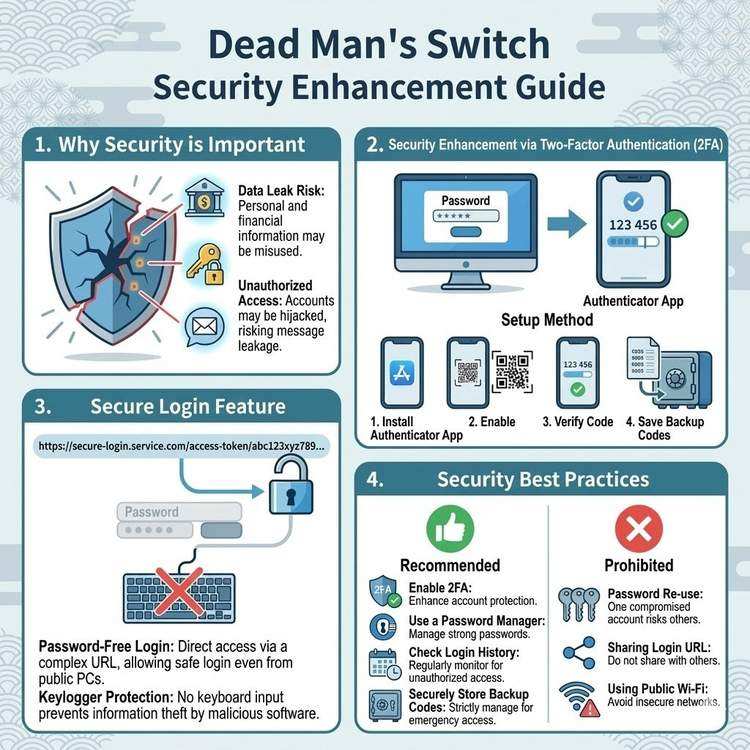
Protecting Your Messages with 2FA and Secure Login
Learn how to protect your critical messages from unauthorized access. A comprehensive guide to setting up and using two-factor authentication and secure login features.